Assess what could happen
Screen hazards, evaluate criticality, and record consequences and controls using your organization’s risk matrix.

Management of Change / Operations · Engineering · Safety
Keep change requests, hazards, reviews, and follow-up actions in one record. MOC helps operations, engineering, and safety teams see what needs review and who owns the next step.
Real app screens. Explore before booking a walkthrough.
For operations, engineering, and safety teams
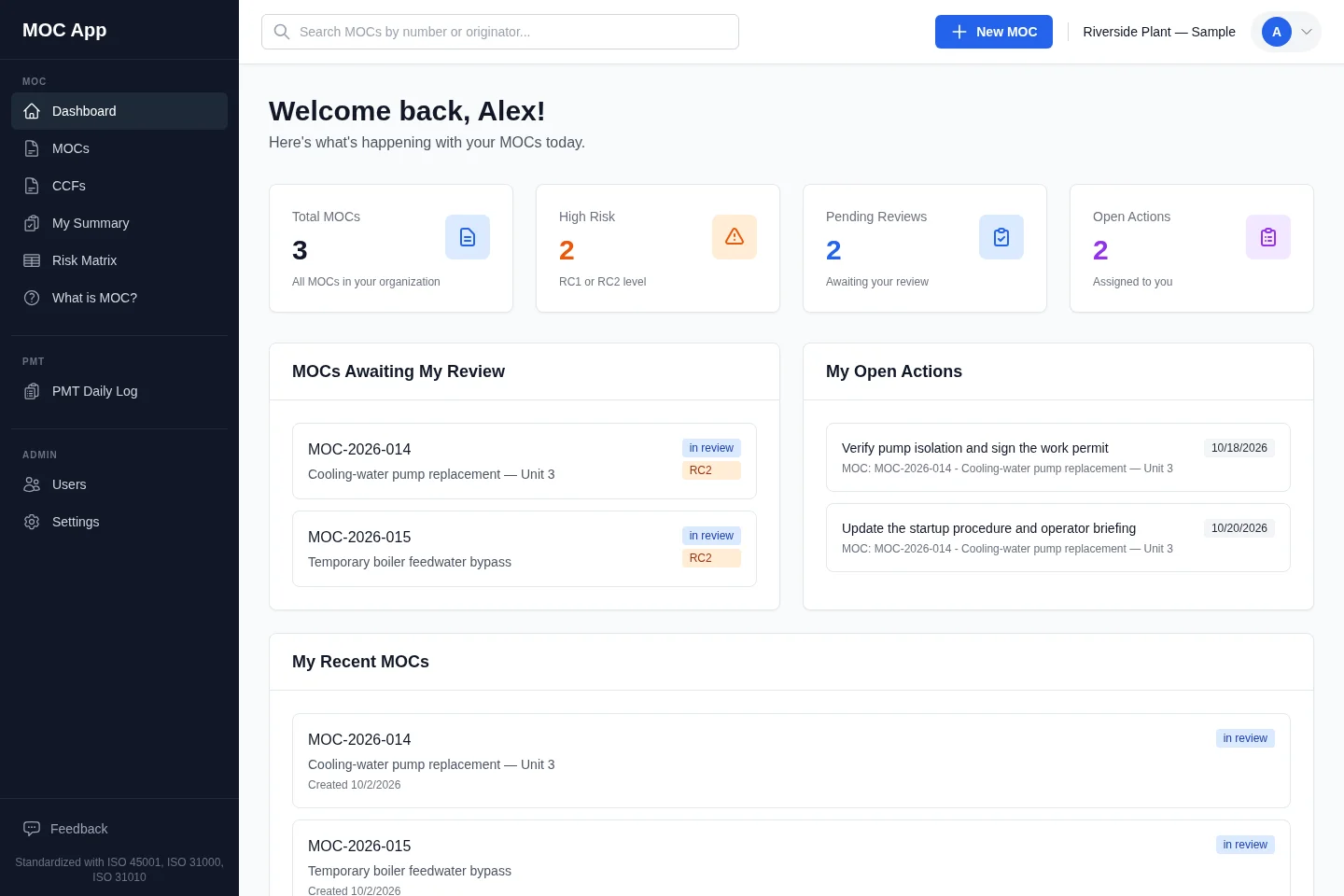
Screen tour of the actual MOC app with sample plant data. Live workspaces require sign-in; no account is needed for this tour.
A sample plant shows changes awaiting review, assigned actions, due dates, and risk levels in MOC’s actual dashboard.
Built around the real work of change
Screen hazards, evaluate criticality, and record consequences and controls using your organization’s risk matrix.
Assign reviewers and approvers. Keep decisions and supporting evidence with the change they belong to.
Track actions, owners, and due dates. Review outstanding work and closure information before closing the record.
Depth when the change calls for it
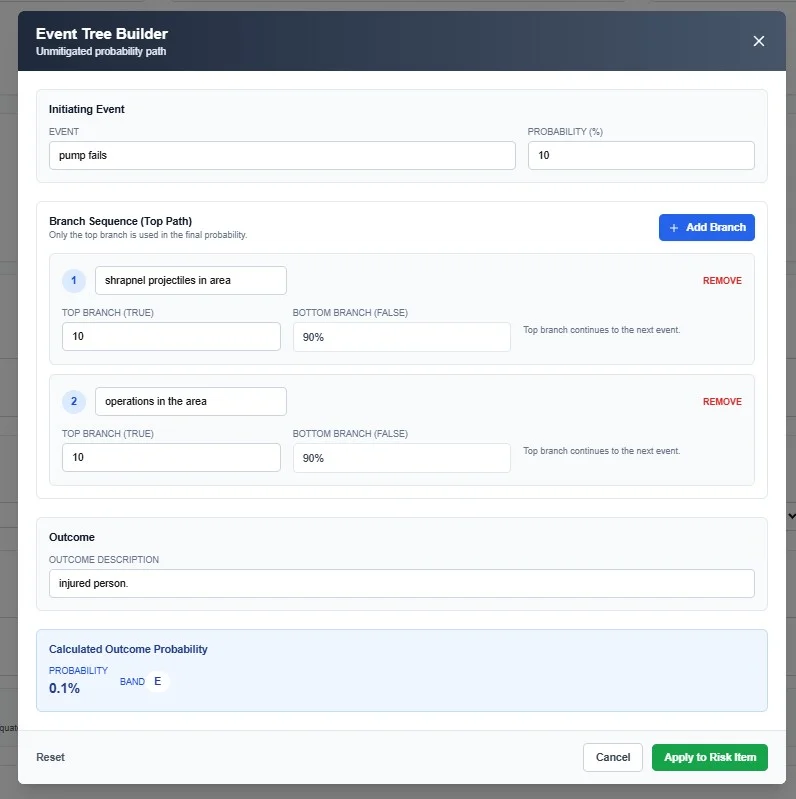
Use FMEA, event trees, and fault trees to explore how a change could fail and what the controls need to do. Keep the analysis available for reviewer confirmation.
| Probability → | |||||
|---|---|---|---|---|---|
| Consequence ↓ | A | B | C | D | E |
| I | Risk classification 1, unmitigated example | Risk classification 1 | Risk classification 1 | Risk classification 2 | Risk classification 3 |
| II | Risk classification 1 | Risk classification 1 | Risk classification 2 | Risk classification 3 | Risk classification 4 |
| III | Risk classification 1 | Risk classification 2 | Risk classification 3 | Risk classification 4, mitigated example | Risk classification 4 |
| IV | Risk classification 2 | Risk classification 3 | Risk classification 4 | Risk classification 4 | Risk classification 4 |
| V | Risk classification 3 | Risk classification 4 | Risk classification 4 | Risk classification 4 | Risk classification 4 |
A–I · RC1: Centrifuge bearing failure—before mitigation.
D–III · RC4: Vibration monitoring and preventive maintenance applied.
Illustrative configuration only. Qualified reviewers must validate risk inputs, mitigations, and final classification for each change.
From first question to next action
Record the scope, timing, affected area, and reason. Add the documents that explain the proposal.
Identify hazards and controls, assign the required reviewers, and collect approval decisions.
Follow assigned actions and confirm closure details. Keep the change history available for the next review.
A few useful answers
Risk thresholds, review roles, approval steps, and the risk matrix can be configured for your organization. Bring your current procedure to the demo so we can walk through the fit.
MOC supports hazard screening, criticality assessment, risk items and controls, FMEA, and event-tree and fault-tree tools. Your reviewers choose the appropriate analysis and confirm its assumptions.
MOC supports documented review, approvals, and action records. Your qualified safety and legal teams remain responsible for applicable OSHA, EPA, and ISO requirements.
Explore the screen tour immediately, without an account. It shows the actual app with sample plant data. A tailored walkthrough covers change requests, assessment, approvals, actions, closeout, configuration, and pricing; live workspaces require sign-in.
For your team
Bring your questions and the workflow you use today. We’ll walk through the product, configuration, and pricing together.
Book an MOC walkthroughChoose a preferred time. We’ll confirm by email.